
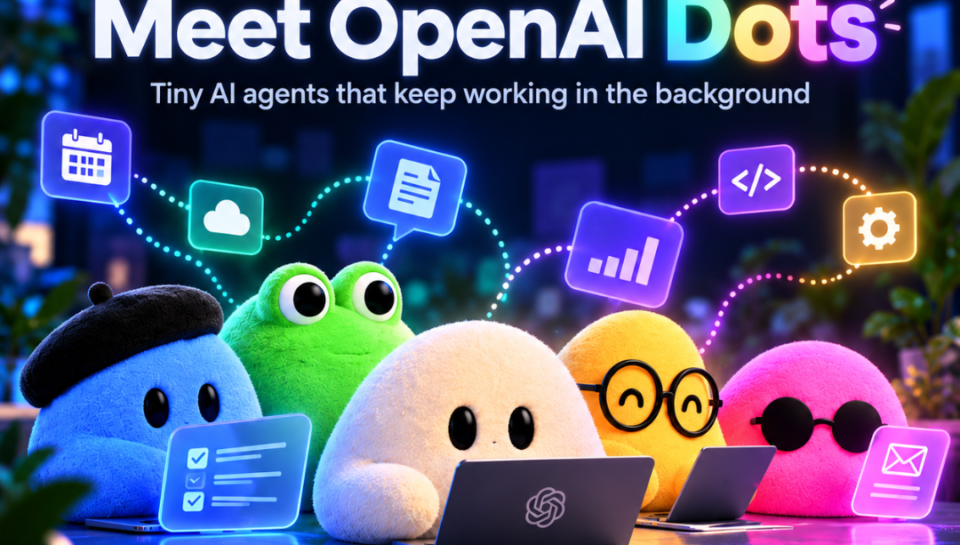
Meet OpenAI Dots: Tiny AI Agents That Keep Working in the Background

Meet OpenAI Dots: Tiny AI Agents That Keep Working in the Background
OpenAI has introduced Dots, a new kind of AI assistant designed to keep working toward your goals even when you are not actively chatting with it. Powered by GPT-6 Astra, these bubbly little assistants can use their own cloud computer, connect with approved apps and handle ongoing tasks in the background.
And yes, they are very cute.
But underneath those colorful, friendly faces is a much bigger idea: What if your AI assistants could do more than just answer questions and actually keep a project moving for you?
What are OpenAI Dots
OpenAI Dots are always-on AI assistants that can take a goal, work through multiple steps and return to you when they need your input.
Instead of prompting AI for every individual task, you can hand a project over to a Dot and let it work through the steps for you.
Why OpenAI Dots Are More Than Just Another AI Assistant
- Handles the bigger picture: Dots can work on an entire project rather than completing one request at a time.
- Its own computer: Each Dot has its own cloud computer and browser.
- Connected tools: Dots can work with apps and tools you choose to connect.
- Background work: They can continue working while you focus on something else.
- Multiple ways to interact: You can reach Dots through ChatGPT, Slack and Teams.
- Human control: You decide what a Dot can access and which actions require approval.
OpenAI says Dots can also use connected tools across more than 4,000 apps, giving them a wider range of ways to work on your behalf.
How Do These Bubbly AI Assistants Work
This is where agentic AI becomes easier to understand.
A regular chatbot generally waits for you to ask something, gives you an answer and waits again. Dots are designed to take a goal and keep working through the steps needed to make progress.
For example, you could give a Dot any project that requires checking information, updating documents, analyzing new data and preparing something for your review.
You are still involved, but you do not necessarily have to manage every little step.
What Can ChatGPT Dots Actually Do
The best way to understand Dots is to look at what they could do for different types of users.
For developers
A Dot can:
- Monitor customer feedback
- Identify recurring bugs
- Work on smaller improvements
- Build and test fixes
- Prepare pull requests for review
OpenAI gives an example of a developer using a Dot to monitor feedback, work on smaller fixes and prepare completed changes for review.
For content creators
A Dot can help:
- Find useful moments in interviews
- Prepare show notes
- Draft social media posts
- Turn one piece of content into multiple assets
- Carry edits across related content
For creators, this could mean spending less time on repetitive production work and more time actually creating.
For researchers
A Dot can:
- Rerun analysis when new data arrives
- Investigate unexpected results
- Update figures
- Revise supporting explanations
- Flag findings that need human review
OpenAI describes a research workflow where a Dot continues analyzing new evidence and updates its work as findings change.
For businesses
Businesses could use Dots for specific workflows such as proposals, customer support, invoice processing, procurement and other repetitive responsibilities.
The bigger idea is simple: give the Dot a job, provide the right context and let it keep the work moving.
How OpenAI Dots Can Improve Productivity
You do not have to be a developer or run a large company to see where these assistants could be useful.
Dots could help when you have:
- Too many repetitive tasks: Let your Dot handle routine work while you focus on higher-value tasks.
- Projects that keep changing: A Dot can respond as new information becomes available.
- Multiple tools to manage: Connect the apps you already use instead of constantly moving information between them.
- Work that needs regular checking: Let the Dot monitor progress instead of checking everything yourself.
- A project you keep postponing: Give the Dot the initial direction and let it start working.
This is one of the biggest differences between traditional AI assistance and AI agents: the focus moves from individual answers to ongoing work.
As AI starts taking on more ongoing responsibilities, it is also changing how businesses approach their digital strategies. Learn how AI is transforming digital marketing and where businesses are already using it to improve their workflows and customer experiences.
Why Do the Dots Look so Cute
Why are these AI agents tiny, colorful blobs?
The playful design makes an otherwise complicated technology feel more approachable. You can give your Dot a name and make it your own, while it gradually learns from your feedback and understands your preferences and standards.
Basically, OpenAI has taken the idea of an AI agent and given it a tiny bubbly face.
Can You Control What Your Dot Does
Yes. You remain in control.
OpenAI says Dots include safeguards, access controls, custom rules, activity monitoring and action reviews. You can choose which apps a Dot can access and decide which actions it can perform independently.
You can:
- Choose which apps it can access
- Set permissions
- Create custom rules
- Require approval for specific actions
- Block actions
- Follow its activity
- Redirect its work when necessary
Sensitive actions can still require you to take over. OpenAI also recommends reviewing consequential work because Dots can make mistakes.
Where Can You Use OpenAI Dots?
Dots are designed to fit into the tools people already use. You can message or call them through ChatGPT, while Slack and Microsoft Teams are also supported. OpenAI says texting support is coming soon.
This means you could start a project in ChatGPT, share relevant context with your team and continue working with the same Dot across supported channels.
For businesses, this could make AI automation feel less like another platform employees have to learn and more like an assistant that fits into existing workflows.
How Can Businesses Use OpenAI Dots
The bigger shift is not simply that AI can now do more tasks. It is that businesses can start thinking about AI in terms of ongoing responsibilities rather than one-off prompts.
- A marketing team could have an AI assistant supporting content workflows.
- A support team could use one for repetitive customer-service tasks.
- A development team could have one monitoring feedback and preparing fixes.
That is where the real potential of agentic AI starts to become interesting for businesses: AI can become part of a workflow instead of being a tool employees remember to open whenever they need an answer.
Read how custom software can improve business efficiency and help businesses build technology around their specific workflows.
Looking to bring AI into your business workflows?
As AI moves from simple chatbots to systems that can reason, use tools and work through multi-step processes, businesses need the right strategy to turn that capability into something useful.
BrainyDX helps businesses explore and implement practical digital and AI-driven solutions designed around real business needs. Whether you are looking to automate repetitive work, improve digital workflows or understand where AI can create value for your team, the right place to start is with the problem you want to solve.
Explore how BrainyDX can help you turn emerging AI capabilities into practical business solutions.
Frequently Asked Questions
- What are OpenAI Dots?
OpenAI Dots are always-on AI agents designed to work toward goals in the background. They can handle multi-step tasks, use connected tools and return to you when they need input.
- How do OpenAI Dots work?
Dots take a goal or task from you and work through the steps needed to make progress. Unlike a traditional chatbot, they can continue working without requiring you to send a new prompt for every step.
- What can OpenAI Dots do?
Dots can help with tasks such as research, content creation, analyzing information, monitoring customer feedback, coding, preparing documents and other ongoing workflows.
- Can OpenAI Dots work in the background?
Yes. One of the main features of Dots is their ability to continue working toward a goal while you focus on other things. They can monitor information, work through tasks and update their progress when needed.
- Who can use OpenAI Dots?
OpenAI Dots are available to ChatGPT Pro and Business Premium users in eligible regions. Enterprise, Edu and Healthcare users can access the beta when enabled by their workspace administrator.